If your projects keep running long, deadlines shift for unclear reasons, and your team stays busy without showing real progress, the issue isn’t planning.
It’s the absence of milestones.
This is one of the biggest—and most painful—patterns across US and European teams: people work hard, but the project doesn’t feel like it moves. Tasks get completed, but progress stays invisible. Priorities blur. Ownership becomes fuzzy. And no one can confidently answer the most basic question:
“Where are we in the project right now?”
This guide fixes that.
You’ll learn what a milestone is in project management, why teams fall apart without them, how to structure milestones correctly, how they look in real-world scenarios, and how milestone tracking inside doBoard turns scattered tasks into a clear, visual workflow.
By the end, you’ll be able to build your own milestone plan in under a minute.
Why Projects Fail Without Milestones
Across remote, hybrid, and fast-moving teams, one underlying pain repeats:
Work is happening, but progress is not visible.
When milestone project management is missing:
Progress becomes subjective. Everything looks equally urgent. Distributed teams interpret the project differently and drift apart in expectations. Minor delays compound into major issues because no one notices them until they become blockers. Deadlines shift silently. Motivation fades because nothing ever feels “done.”
Milestones eliminate that uncertainty by turning progress into something visible, shared, and verifiable.
Want to see what milestone clarity looks like in a real workflow tool?
Create your first milestone plan in doBoard in 10 seconds — zero setup, zero learning curve.
Start free — build your first milestone instantly.
What a Milestone Really Is (A Clear Definition)
A milestone is a meaningful checkpoint that confirms your project has advanced.
It’s not a task.
It’s not a deliverable.
And it’s definitely not a vague “phase” that sits in a slide deck.
A milestone answers one critical question:
“What must be true before we can move to the next stage?”
In real projects, that often means:
-
design has been approved
-
a prototype is ready
-
development is complete
-
legal review is done
-
a landing page is published
-
a beta version has shipped
When milestones aren’t defined, the project becomes a long list of tasks with no real finish lines.
Milestone vs. Task vs. Deliverable
One of the biggest pains teams report is confusion.
People mix tasks, outputs, and progress indicators, which destroys clarity.
A task represents effort.
A deliverable represents output.
A milestone represents progress.
For example, a team may write copy, create a design, and build a page in a CMS. But a milestone only appears when the page is published and live. That moment is the verified checkpoint.
Teams that make this distinction instantly reduce chaos.
How to Create Project Milestones: A Practical Framework
Most articles make milestone project management sound conceptual.
This framework is built for real deadlines, distributed teams, and high-pressure environments.
Step 1 — Define the End Goal
Before you create a single milestone, define what “done” means.
Clarify the outcome, how it will be measured, and who relies on it.
Most delays happen because teams start working before defining success.
Step 2 — Break the Goal Into 3–7 Meaningful Milestones
A project becomes predictable when its outcome is broken into a small number of key checkpoints.
In software, these are often:
requirements approved
prototype ready
development complete
QA passed
release shipped
In marketing, milestones typically revolve around:
strategy approved
content finalized
design approved
landing page published
campaign launched
If you end up with ten or more “milestones,” you’re listing tasks, not stages.
Step 3 — Attach Deliverables
Many US/EU teams struggle because milestones sound aspirational but aren’t tied to actual work.
Deliverables make them real.
For example, the milestone “Landing page published” includes finalized copy, finished design, CMS implementation, QA review, and the actual publishing event.
This makes progress measurable and predictable.
Step 4 — Track Milestones Visually
A common pain: milestones end up in docs and slides, where no one revisits them.
In doBoard, milestones are part of the workflow itself.
They appear on the board, the timeline, and the calendar.
They stay connected to real tasks, owners, and blockers.
Progress becomes visible.
Delays become obvious early.
Teams no longer need endless syncs to “figure out where we are.”
See How Milestone Tracking Works Inside doBoard
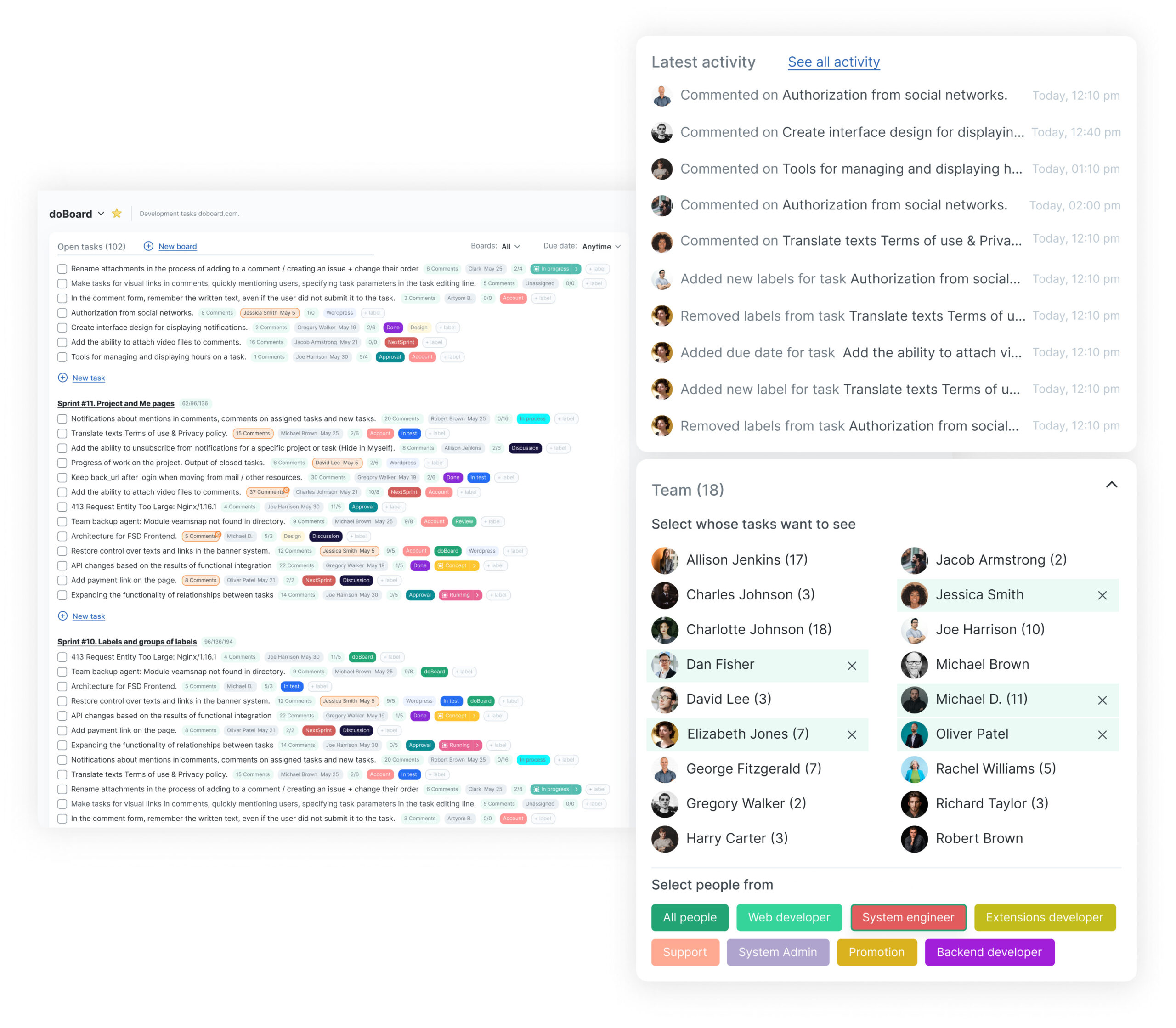
Inside doBoard, milestones are not labels.
They’re visual checkpoints tied directly to real work.
>As blockers appear, teams see them instantly.
a-end=”5632″ />>As deliverables complete, milestone status updates automatically.
Try this milestone workflow in your workspace — free forever.
A Real Example: What a Milestone Plan Looks Like
In engineering teams, the milestone “Prototype ready” usually includes design concepts, architectural outlines, and basic interaction models.
The milestone “Development complete” indicates that core features work, integrations are implemented, and initial security checks are done.
The milestone “QA approved” means test cases have passed, major bugs have been resolved, and regression tests confirm stability.
This level of clarity keeps everyone aligned — even across time zones.
Why Milestones Improve Team Performance
Teams that adopt milestone project management consistently report fewer surprises, fewer escalations, and significantly less rework. Communication becomes clearer. Handovers smoother. Expectations aligned. Stakeholders have visibility, and individual contributors understand how their work contributes to progress.
Milestones transform constant motion into meaningful progress.
The Hidden Truth: Milestones Reduce Stress
Burnout doesn’t come from work volume.
It comes from not knowing whether the work is working.
Milestones restore that sense of direction.
/>>They turn an overwhelming project into a sequence of visible wins.<br class=”yoast-text-mark” data-start=”6997″ data-end=”7000″ />>They reduce last-minute pressure because problems become detectable early.
>They cut meetings, eliminate redundant updates, and remove the ambiguity that causes most tension.
With milestones, teams finally feel momentum.
Build Your First Milestone Plan in Under One Minute
Top-performing teams don’t just talk about milestones. They track them.
doBoard gives you:
built-in milestone templates
visual progress tracking
dependency mapping
real-time blockers
team-wide alignment
zero learning curve
Start for free — no credit card required.
Build your milestone plan today and make every project clearer, faster, and easier.
FAQ — Project Milestones
What is a milestone in project management?
A milestone is a major checkpoint that confirms measurable progress in a project.
How many milestones should a project have?
Most projects work best with three to seven milestones.
What is the difference between a milestone and a deliverable?
A deliverable is a completed output.
A milestone is a progress checkpoint.
How do I track milestones effectively?
Use a visual milestone tracker like doBoard to connect tasks, deliverables, and stages in one workflow.
Why do milestones matter?
They reveal progress, prevent hidden delays, align teams, and reduce stress.

Throughout my career, I’ve led projects in FMCG, retail, and e-commerce — from launching mobile apps to optimizing advertising and implementing CRM systems.
I’m passionate about data-driven marketing and enjoy turning complex challenges into clear, effective strategies.
- WordPress Website Maintenance Checklist - September 29, 2025
- Editorial Calendar for SEO: Plan Content Strategy Smarter - September 28, 2025
- Why Website Owners Struggle With SEO and How doBoard Helps - September 23, 2025