When I started my marketing career, I initially treated task prioritization like philosophy — the classic “important vs. urgent” model.
However, real prioritization?
It’s not philosophical. It’s messy, fast, unforgiving — and absolutely essential for every team.
In fact, you either prioritize your work,
or your work takes control of your day.
Eventually, everything changed when I moved from guesswork to a task prioritization framework — and later, when I put that framework inside doBoard.
Why Task Prioritization Fails for Most Teams
Most teams don’t actually have a planning problem.
They have a prioritization problem.
Here’s why task prioritization often fails:
-
everything looks equally urgent
-
there is no shared prioritization method
-
tasks aren’t connected to goals
-
decisions rely on “gut feeling,” not impact
-
no system shows what actually moves the needle

When everything is a priority, nothing truly is.
This is why teams drown in:
-
reactive work
-
shifting deadlines
-
unclear expectations
-
duplicated efforts
-
constant “quick asks”
Task prioritization fails when there’s no framework and no shared visibility.
A Simple Framework to Prioritize Tasks Effectively
And because of that, this is the prioritization framework I use today — inside doBoard — and it has transformed how my team works.
Step 1 — Define Goal-Based Priorities
Before prioritizing tasks, define what the next meaningful outcome is.
Ask:
“What are we actually trying to achieve?”
This eliminates tasks that do not support the goal — a major source of chaos.
Step 2 — Use Value-Based Prioritization (Impact Scoring)
Instead of urgency, evaluate impact:
-
Does this task move the main goal?
-
Does it unblock teammates?
-
Does it reduce future workload?
-
Does it prevent a risk?
High-impact tasks move to the top instantly.
This is the core of value-based prioritization.
Step 3 — Analyze Effort (Effort vs Impact Grid)
This is the moment where clarity happens.
-
High impact + low effort → Do now
-
High impact + high effort → Plan
-
Low impact + low effort → Automate or batch
-
Low impact + high effort → Eliminate
This turns emotional decision-making into a logic-based system.
Step 4 — Build a Transparent Prioritization Workflow in doBoard
This is where everything becomes visible.
In doBoard, I:
-
attach each task to a goal
-
add context (“Why this? What is the impact?”)
-
filter tasks by impact, effort, or blockers
-
identify what slows the team down
-
see real-time progress instead of guessing
doBoard transforms a list of tasks into a task prioritization workflow anyone on the team can follow.
Japanese “5 Whys” Method for Better Task Prioritization
A lesson from Japanese marketers changed everything.
Instead of asking:
“What should we do first?”
they asked:
“Why is this task important?”
Five times.
This root cause prioritization reveals:
-
unnecessary tasks
-
duplicated tasks
-
tasks that don’t affect outcomes
-
the real bottleneck the team must fix
Today I recreate this logic in doBoard by adding context, linking tasks to goals, and filtering by impact.
It removes bias and leaves clarity.
What Prioritization Looks Like Today Inside doBoard
My process now:
- Start by defining the main goal
- Then give each task clear “why” context
- Next, evaluate tasks by their impact
- After that, estimate the effort required
- Once done, apply doBoard filters to surface blockers
- Finally, monitor progress through a visual workflow
This is task prioritization with evidence — not intuition.
The Results of Using a Task Prioritization Framework
Once the team adopted a structured prioritization system:
-
deadlines stabilized
-
meetings became shorter
-
fewer tasks slipped
-
fewer surprises appeared
-
productivity increased without burnout
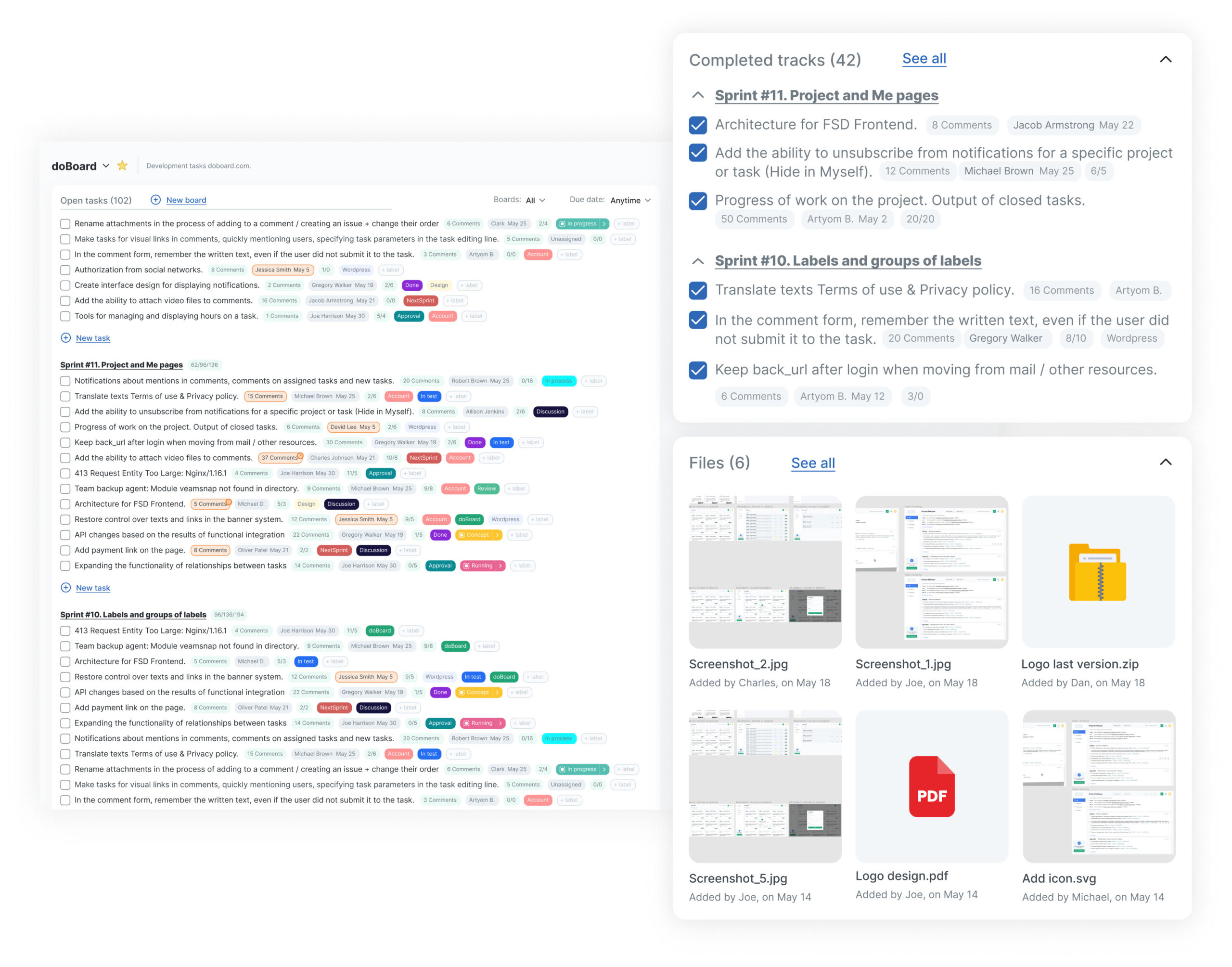
We reached next year’s goal three months early — simply by choosing the right work.
The Hidden Challenge: How to Prioritize When Everything Is Working
This is the part nobody talks about.
When your system works well and goals are met early, you face a new question:
“What do we improve next?”
That’s when I return to my prioritization map in doBoard and ask:
What moves the goal fastest — now?
My Personal Prioritization Rules (That Finally Stick)
In work — choose what moves the goal.
end=”5450″ />>In life — choose what you won’t regret.
And when everything feels overwhelming, I don’t spiral.
I open doBoard, zoom out, and see exactly what matters.
Try doBoard — Prioritize Tasks With Clarity, Not Stress
In practice, doBoard isn’t just a task list.
It’s a task prioritization tool for teams that need clarity, visibility, and goal alignment.
Consequently, it helps you:
- Prioritize tasks by impact
- Connect work to goals
- Track real progress
- Reduce chaos instantly
Try doBoard for free — no credit card, 10 seconds to start.
FAQ — Task Prioritization (SEO Rich Snippets)
Q: What is the best way to prioritize tasks?
A: The best method is value-based prioritization — ranking tasks by impact, effort, urgency, and dependencies. Tools like doBoard help visualize priorities clearly.
Q: How do you prioritize tasks in a team?
A: Use a shared prioritization workflow where tasks connect to goals, impact scores, and blockers. doBoard makes this process transparent.
Q: What is a task prioritization framework?
A: It’s a structured method for ranking tasks based on impact, effort, and alignment with goals. Frameworks like Impact/Effort and 5 Whys improve clarity.
Q: How do I reduce chaos when prioritizing work?
A: Centralize tasks, use consistent criteria, visualize blockers, and track progress. doBoard automates these steps.
Q: Which prioritization method works best for marketing teams?
A: Value-based prioritization combined with goal mapping is highly effective because it prevents low-impact work and improves team alignment.
Want to go deeper? Check out this post on building a culture of accountability with doBoard

Throughout my career, I’ve led projects in FMCG, retail, and e-commerce — from launching mobile apps to optimizing advertising and implementing CRM systems.
I’m passionate about data-driven marketing and enjoy turning complex challenges into clear, effective strategies.
- How to Prepare for a Job Interview in 2025 — Remote Interview Tips, Checklist & Stories That Actually Help - December 15, 2025
- What Are Story Points (And Why They Actually Make Planning Easier) - December 15, 2025
- Milestone Project Management Made Simple — With Real Examples and doBoard - December 15, 2025
Pingback:Time Management in Agile with doBoard
Pingback:team Planning That Works: How Distributed Teams
Pingback:What Are Story Points and Why They Work in Agile Teams
Pingback:How to Prepare for a Job Interview (Remote-Friendly Guide)